

Dreaming on Flowdock
Even dreams need organization. Even dreams must be able to tell their story through an organized flow of communication.


The talk Dreaming by Andrea Provaglio at the latest edition of Better Software was really interesting: what struck me most was the description of a possible proactive company organization model built around the concepts of dream, order and action.

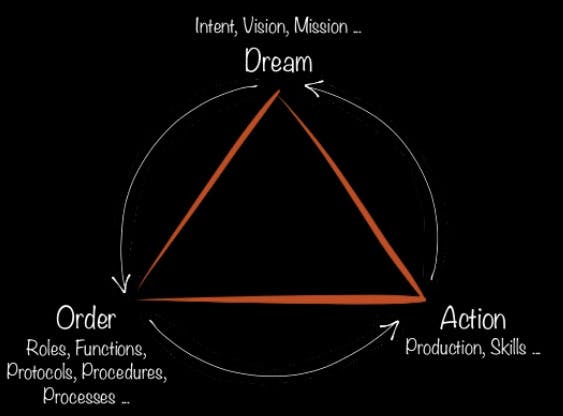
The dream as purpose, mission, vision; as the driving force that defines the order, roles, functions and protocols needed to come true with clarity. The order that generates action, the actual production of value: the results, positive or negative, can lead to confirming or redefining the dream itself.
Provaglio suggested that the weight of the three conceptual areas can vary considerably from company to company, leaning toward one dimension rather than another.
Dreaming at Cantiere
For Cantiere Creativo, the last two years were definitely the years of the “dream”: we imagined ourselves and decided what we want to be when we grow up and which direction to take.
All this “dreaming” certainly didn't come without action, quite the opposite: lots of great work, lots of initiatives and lots of new people on our team. In 2014 we definitely need to bring in some order: what we could get away with when there were five of us feels a bit tight now that there are thirteen of us. And, as often happens, the first problem to tackle is communication, both internally and with clients.
How many tools do we use every day to pass along short-lived information? Voice, phone, email, Skype, Google Hangout, Gtalk, HipChat...
Having so many communication tools creates the risk that information doesn't reach the right person and gets lost in the background noise. For a small team, using several channels wasn't a big problem: there was always face-to-face talk to fill any gaps.
As the team grew, though, and considering that some people work 100% remotely, we felt it was essential to find a single tool to talk, joke around and bond, share doubts, knowledge and discoveries, and keep the whole team involved: a team that grows because projects grow and, at the same time, so do the issues to manage with clients.
Communicating in Extreme Programming
One of the requirements of Extreme Programming is that the client is always available. We can't expect the client to be in the office every day, so the tool should let us create separate contexts for each project, where the assigned team and the client can communicate daily. A place where information stays accessible and available over time.
Our first thought went straight to HipChat, a platform we had happily used on a couple of projects.
We started evaluating similar tools, but personally I kept my preference for this software, eyeing every possible alternative with suspicion: so much for mental flexibility!
HipChat has plenty going for it: at Cantiere some of us use Linux, some OSX, some Windows, and HC is cross-platform; the Android and iOS apps work well, and there are many hooks for integrating the services we care about: git, heroku, CI.
Plus, our friend Rasky built a connector for Trello, our trusty project management tool. For our needs, though, it doesn't seem to be enough.
Not being able to manage multiple contexts is a critical issue: you can create multiple rooms, but all within a single organization, with no way to isolate different projects from each other.
But generally nobody wants client “A” to see client “B”... So each team member had to register several HipChat accounts with different email addresses, one per client, logging out and back in every time to switch context. Unworkable.
Moving past HipChat
So we evaluated other products, but in the end the ones that looked most interesting for our needs were Campfire and Flowdock.
Campfire, although well designed, didn't really convince us and was ruled out fairly quickly. We evaluated it out of respect for the fact that it was the first service of its kind and, in a way, set the standard.
Flowdock, despite costing more than all the others, caught our interest. We ran a one-month trial with five people before adopting it for good as our official communication tool.
Why Flowdock
I remember the first two days of the trial as fairly traumatic. Flowdock comes with a split view that forces you to use it full screen: the left side collects all the notifications from the various configurable external services, the right side holds the actual chat. A bit odd...

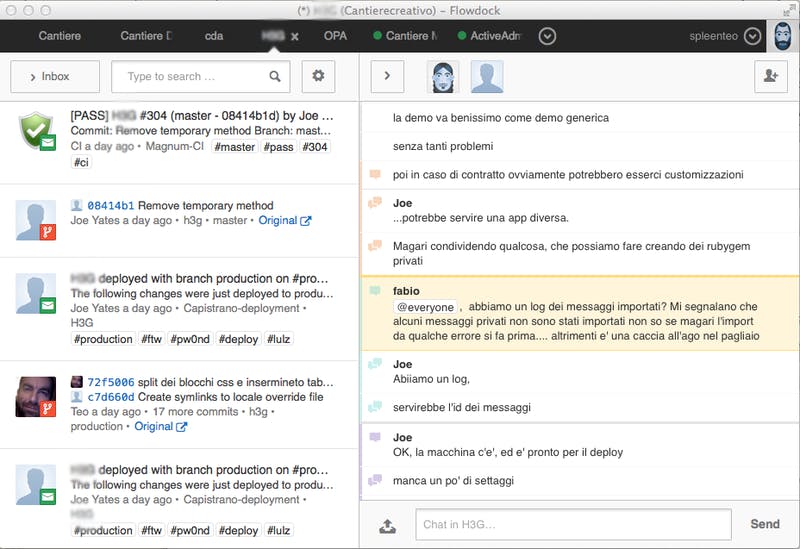
The OS X app, like the Android and iOS ones, was nothing more than a wrapper around the website, and this made us worry about performance. The mobile apps were notification machine guns.
All this at 30% more cost: HipChat was still at the top of my ranking!
Then, once past the initial shock, we learned to appreciate the UI choices and the other features of this chat platform.
Trusting the Flow
Rooms are called “flows”; each one is a world of its own, with its own users and its own hooks. The Trello integration is complete: each flow can be hooked up to one or more boards and gets notified of every update.
The same goes for the other external services that typically make up our development stack: GitLab, Errbit, Heroku, Pivotal Tracker and Magnum CI.

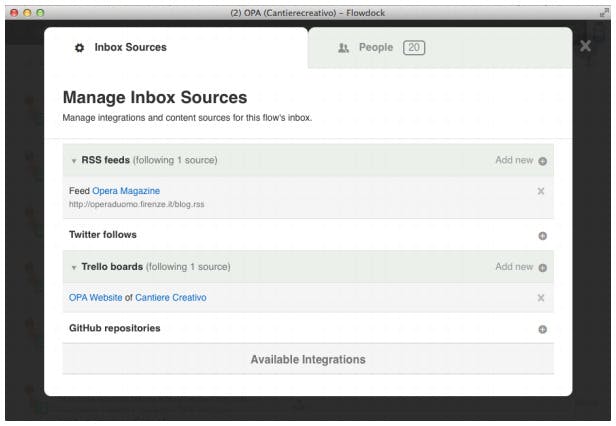
You can also connect social accounts: on the marketing team's internal flow, for example, we hooked up our Twitter account, so it's monitored constantly.
The chat stream never gets “cluttered” by notifications, which is what happens in HipChat.

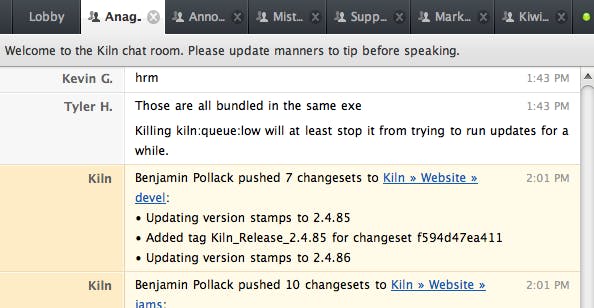
So we're free to add lots of hooks (and therefore lots of notifications) without ever losing readability.
Another winning feature: threads inside the chat. When lots of people are writing, discussions overlap and it's easy to lose track of who is replying to whom.
Flowdock, however, lets you pick the message you want to reply to, turning the left side into a single-thread discussion while the full stream keeps flowing on the right.
Once you get the hang of it, it's really useful!
So are the #tag you can add to your messages, making them quick to find later.
All the other HipChat features are there: you can mention *@stefano, who then gets a notification that someone is looking for them, or use *@everyone to alert everyone, or @anyone to get the attention of whoever is online at the moment.
There's also 1-to-1 chat and a history of links, images and attachments. The fear of sluggishness turned out to be unfounded: the site works damn well and, in the meantime, the mobile apps have become 100% native, with all the benefits in usability and responsiveness.
Full speed ahead with Flowdock
We're thrilled with our choice, which turned out to be a great one. Not everyone loves it, especially those who don't get to use it daily. But a few “flight hours” are enough to get comfortable with it.
We always know how and where to find @someone and leave them a message they'll read as soon as possible, we can catch up with the team by reading discussions that happened while we were away, and we can check notifications from the various services without keeping five other programs or browser tabs open.
The only current downside: the €3 per user per month cost is fair for the service offered, but having to pay twice over for each user in every new organization they have access to drives costs up considerably! We're happy to pay to include our clients' accounts but, if we've already paid for @stefano as a Cantiere member who in turn creates a “Project XX” organization, why do we have to pay for @stefano again?


