

Gatsby JS vs Next.js: which static site generator should you choose?
One of React's strengths is the complete modularity of its components. Although many React sites are dynamic single-page applications, its flexibility also lets us use it for static sites.Gatsby was the first successful static site generator built on React, but the newcomer, Next.js, is getting a lot of attention. Will the comparison between the two be a fair fight?


Static sites bring many advantages, but they have their flaws too. A major drawback of static sites is that they generally don't help editors see what the end result will look like while they produce content. One of the most important features introduced by Gatsby is precisely its preview system, designed to let editors update the CMS and instantly see the results on a staging site visible only to them. Next.js also offers a preview system, but instead of using a duplicate site, it lets you see changes in real time on the production site, without real users being able to peek at unpublished changes. Let's look at the pros and cons of both systems.
When to use Gatsby or Next.js
Working with JavaScript is always a race against time: we can never know whether the libraries we pick will be maintained for long, or whether something newer and faster will appear on the horizon a couple of weeks later. Here at Cantiere Creativo we faced exactly this problem when choosing the static site generator (SSG) to pair with DatoCMS. Initially we leaned toward Gatsby, especially when we needed a substantial front-end. The arrival of Next.js reshuffled the deck. Our experience alone, however, isn't enough to compare the two SSGs without considering different use cases. First, we'll evaluate the two static site generators from a developer's point of view, looking at how you code with them and what advantages each one offers. Second, we'll weigh the pros and cons of the two solutions from an editor's point of view, considering aspects such as preview capabilities and data management. Finally, we'll focus on the end-user experience. Let's start with Gatsby.js. Gatsby can be fun, easy and fast to use when you want to put something together quickly, but:
- It's complicated to develop;
- It's static only!

How Gatsby.js works
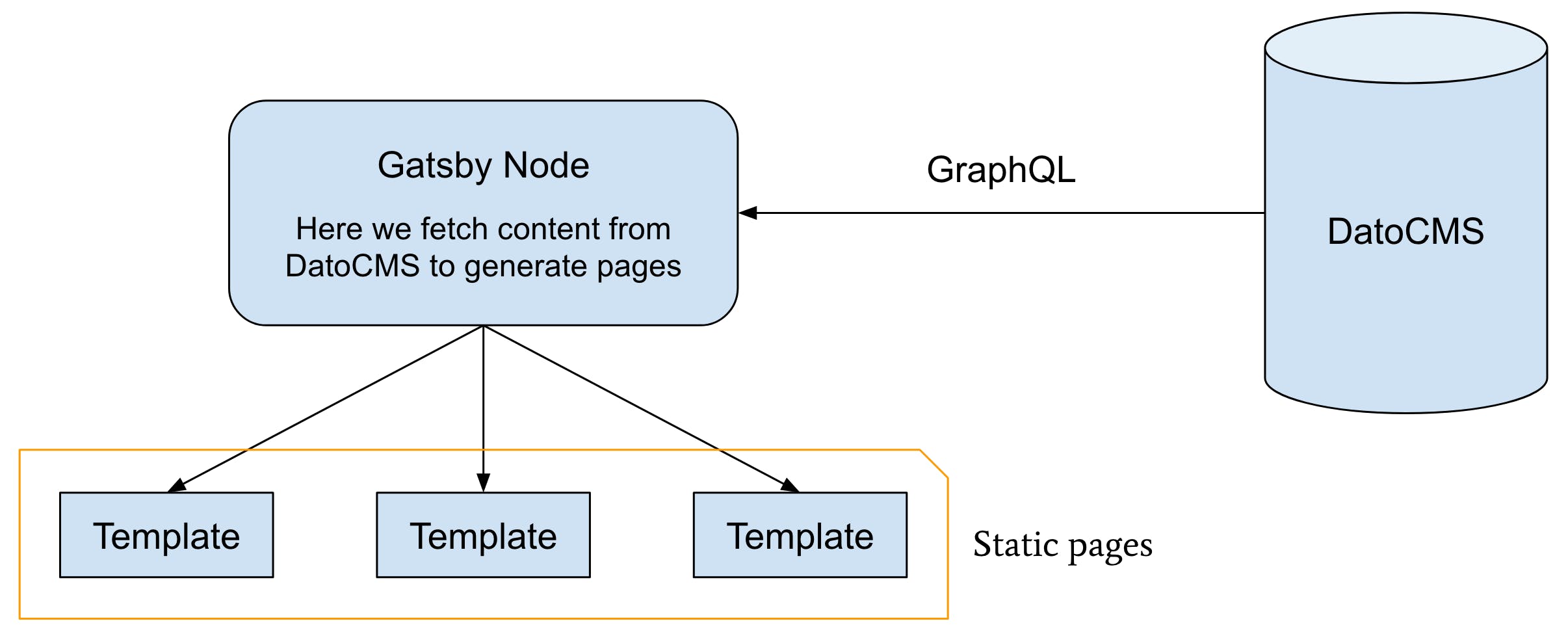
Here's how we use Gatsby. We fetch the data we need to generate the pages through GraphQL. This happens in the gatsby-node.js file, where we iterate over the locales array and, for each locale, generate pages in every language. Careful, though: what we call a “page” can be confusing. Gatsby has two folders: pages and templates. Pages are the final result of what you code, so if we have a page called about.js, it will display exactly what we wrote in it at the `/about` path. Templates are the files we specify when creating pages, so if we fetch data from our CMS and want to create, for example, a team member page /team/elon-musk, we'll have a template called team-member.js that we pass to the create function during the build. The newly created page will take on the template's styling.

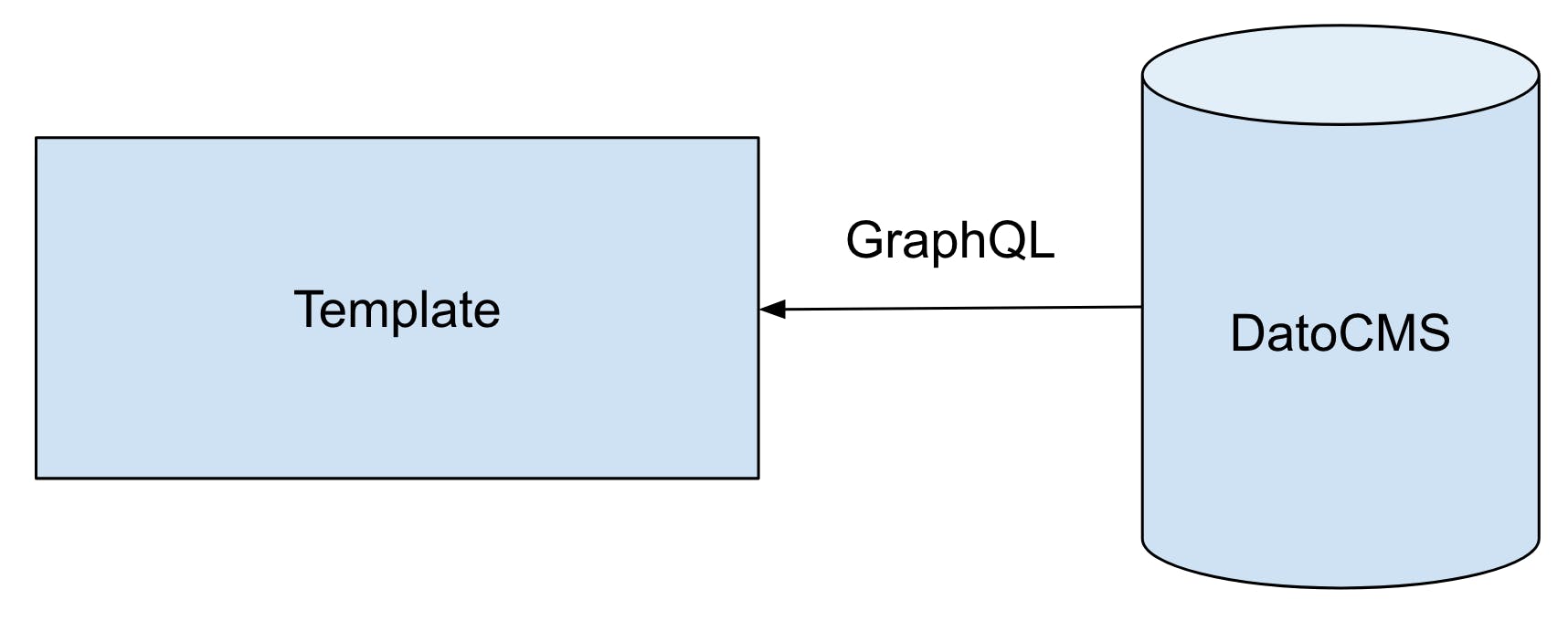
Inside the template we fetch all the page content, from the title to galleries to SEO tags. From the page, on the other hand, we call the CMS and fetch the data we need using GraphQL via props.
Gatsby pros and cons
After a few months of working with Gatsby, however, we found ourselves battling incomprehensible errors: the cache wasn't cleared properly and, above all, after passing many records through GraphQL, build times went from a few seconds to several minutes! That last part isn't directly GatsbyJS's fault; the problem here is GraphQL, which unfortunately is the only data-fetching tool Gatsby lets us use. Now that we've seen how Gatsby works, we can sum up the pros and cons for the three roles involved. From a developer's point of view. Pros:
- Easy to configure;
- High performance;
- The best choice for small, simple websites.
Cons:
- It's a pure SSG, so it doesn't support dynamic pages (natively);
- Cache invalidation is a problem.
As an editor. Pros:
- Easy to change data, since you work directly in the CMS;
- You can use any CMS that supports GraphQL. We use and recommend DatoCMS, which is fast, easy to use and always up to date with cutting-edge technology.
Cons:
- There's no real preview mode, just a sort of hack based on React's dev mode, which also comes with a monthly fee;
- Lots of data slows the build down considerably. We had a website with about 1,000 records (pages and single instances) and the build took 8 minutes to complete.
As a user. Pros: Very fast websites. Cons: When it comes to static websites, it's hard to point to cons specific to Gatsby.
How Next.js works
Our new go-to solution is Next.js, which first and foremost lets us decide how to fetch data. That's why there's just one getInitialProps () function, which lets you use a 'fetch ()' to retrieve data from an API however you like.

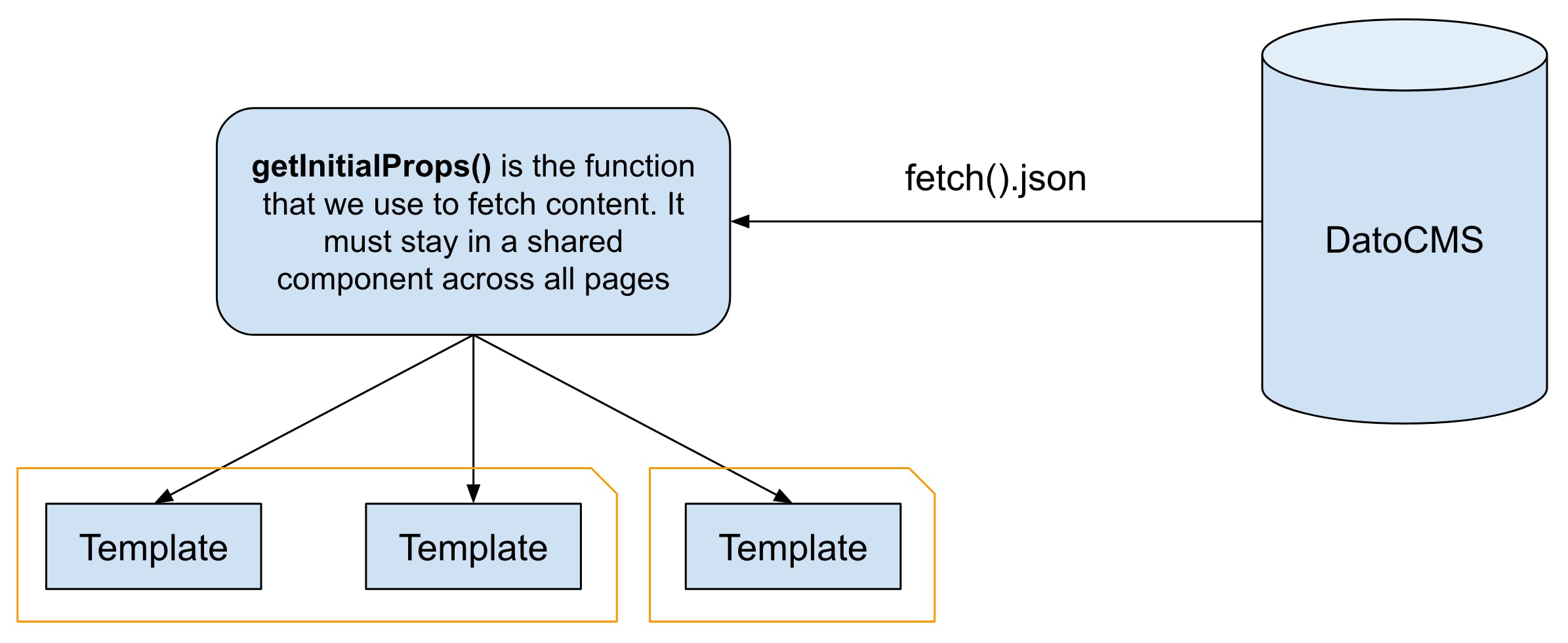
Fetching data from this function lets you send content to pages via props, just like Gatsby. getInitialProps can only be added to the default component exported by a page; adding it to any other component won't work. The value of this approach is that you don't have to use GraphQL every time, because Next.js leaves it up to the developer to decide how to handle data. That way, if GraphQL turns out to be a bottleneck for your project, you can switch to something else. Another great feature of Next.js is that you can have both static and dynamic pages. Instead of making every page static like Gatsby, you can choose to have SSR pages that are handled like in any other server-side language.
Next.js pros and cons
As developers. Pros:
- Very versatile, because it lets you choose how to fetch data;
- Static and dynamic pages can live side by side;
- getStaticProps and getServerSideProps make managing and fetching data much easier.
Cons:
- More complex than GatsbyJS, it takes more development time and a higher skill level;
- Server-side programming knowledge required (for SSR pages);
- You have to use Vercel to handle deployment and build configuration.
As an editor. Pros:
- Fetch data however you want, with any CMS (or other custom systems) as long as it exposes an API;
- Cookie-based real-time content editing: there's no need to set up another environment, just enter data in the CMS to see immediately how it looks on the website before publishing.
Cons:
- Nothing in particular.
As a user. Pros:
- The website can be part static and part dynamic, so it can meet any need.
Cons:
- The dynamic part of the website can break, although this is rarer than with fully dynamic sites.
Comparing the two solutions
This isn't a fight to the death between the two site generators, but rather a comparison to help you figure out which solution is best for the job at hand. From a developer's point of view, Next.js is harder to work with but, paradoxically, ends up causing fewer problems. As an editor, Next.js is better thanks to its native preview mode, which shows data exactly as it will appear in production.
An example
Say we have a content-rich blog with more than 100 pages. Static approach If we make every page static, we have to wait for Gatsby to render them all. We can only browse the website after a long build. Dynamic approach We make only the latest ten posts static and, thanks to Next.js, let the server take care of the rest. The website will take less than a minute to build because there are only a few static pages, so the site goes live sooner. When someone visits an older post, the server will render that page, like a regular dynamic site. The difference is that this only happens the first time; the second visitor will already see the static version of the page.
Conclusions
Both systems have pros and cons. Gatsby is easier to learn and produces indestructible static websites. It provides a preview system (a paid one, though) and is fairly simple. On the flip side, don't expect it to be blazing fast at build time, because the process can take a long time if you have more than 1,000 records in your CMS. Next.js has an excellent (and free) preview system and lets you add dynamic elements when and where you need them. You can also fetch data however you like. Next.js, however, is harder to code. Whether you use it in hybrid mode (static + dynamic) or static only, it requires more programming knowledge.


