

Editorial planning with DatoCMS
Need to schedule news or articles to go live at a set time? With DatoCMS you can do it directly from the calendar feature. Here's how.
Need to schedule news or articles to go live at a set time? With DatoCMS you can do it directly from the calendar feature. Here's how.


How do you manage content that follows a specific editorial plan?
When an editorial team handles a large volume of content, it needs a tool to schedule news, articles or promotional flyers clearly and simply, so it can stick to the editorial plan drawn up during the strategy phase and reach its goals.
That need is what gave rise to the DatoCMS calendar feature, which makes scheduling and publishing content intuitive and just a few clicks away.


The calendar is at the top right of the page you're working on, between the content's status (“draft”, “saved” or “published”) and the button to save or publish it.
It lets you choose the exact moment to publish.

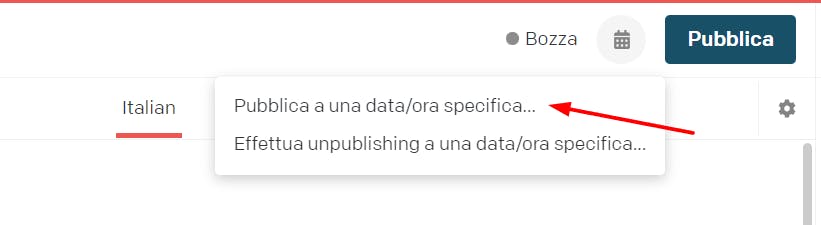
You can pick the publication date and time by clicking “Pubblica a una data/ora specifica” (Publish at a specific date/time).
What if you need to publish content that's only valid for a limited time?
If you need to publish an event or a promotional flyer, just use the calendar feature to set not only the publication date but also the “unpublishing” date, so the content is no longer visible after that.
Remember to update the deploy!
You've probably noticed that in DatoCMS you need to trigger the build, available at the top right, to make your changes visible on the site. With the calendar, the build starts automatically, so your content will be online within minutes.
If your site doesn't have a scheduling calendar and you think it would be useful, don't hesitate to contact us.
If instead you're interested in building a site with DatoCMS, get in touch for a free, no-obligation consultation.


