

Trello and How It Boosts Business Productivity
We'd long had the feeling that the tools we used to organize our work, on one hand, and endless email threads, on the other, were too limiting for our vision. We needed something completely different. Then we discovered Trello.


2015 update
This article dates from 2013 and no longer reflects how we approach development or the tools we use today. Discover our method as we see it today!
Interested in Trello? Try it now!
Constant evolution
Being Cantiere Creativo means never tiring of thinking up new things and thinking in new ways. We believe in what we do, and that's exactly why the first things we question are our habits, our know-how and our workflow.
This is how the app's creator describes Trello:
… a super simple, web-based team coordination system. The feedback has been overwhelmingly positive and adoption has been very strong, even in its early state ... It’s 100% hosted; there will never be an “installed software” version of Trello …
Trello is a completely free web application released by FogCreek Software for managing ideas.
Ideas? Not projects!?
Trello is a horizontal application: you can use it to manage software projects and track what your team is working on, or to manage proposals for the next product marketing campaign you want to launch.
A completely neutral container that, precisely because of its neutrality, can hold any project. Or rather: any idea.
The app lets you build your own management flow, although it does of course provide a sample board to start getting organized; it doesn't suggest predefined paths or best practices, and getting the most out of it takes a fair amount of experimentation and, yes, creativity. Because with Trello you can organize literally any activity: from writing a novel to programming software.
Complicated? Not at all!
Put this way, Trello might sound complicated, but it isn't: everything is extremely intuitive and very easy to use.
Trello in the Cantiere workflow
The four cardinal points our workflow is built on are:
- Google App
- DropBox
- Redmine
- Trello
The first two are well-known, general-purpose cloud systems for managing email, calendars and shared documents.
Redmine, on the other hand, is a task management tool that lets us track our work, sharing individual tasks with the client, logging time worked and reporting everything by project or staff member.
Nothing unusual so far for a company that develops web projects.
Trello is our new addition, and we're using it to manage every project, internal and external, for planning, workflow and scheduling. Introducing it completely shook up the system, but in a good way.
Managing work in Redmine (as in any other task manager of the same kind) makes it hard to get a clear, quick picture of where things stand, forcing you to filter constantly and use a lot of imagination in reports.
We also needed a tool to manage sprints and our activities, from project assignments to weekly coordination meetings.
We found all of this in Trello.
Differences in use
Trello: simple, fast and immediate UI, real-time, multi-user cards. Excellent mobile version. Easy organization and management of sprints (weekly, for example).
Redmine: time reports, bug reports, long-term tasks, project reporting and financial analysis.
Trello and Redmine integrate easily: it's not unusual for a Trello card to reference more than one Redmine task to track time against…
2 ways to use Trello:
Let's be clear: these aren't 2 ways for everyone, they're our two ways of using it.
They may be too much for some and far too little for others. Rumor has it someone on the team even keeps their grocery lists in Trello :)
Internal organization
The goal is to see who's doing what and understand workloads and priorities for each project.
This is an important aid in our weekly team meetings, to figure out what to focus on and plan the work for the next period based on the backlog.
We can plan the work for the following week as an agile sprint, knowing where every team member is, quickly and with all the references to Redmine tasks and attached project documents.
It doesn't hurt that Trello has an excellent mobile app, for both smartphones (iOS and Android) and tablets (Windows 8 too), with the same full functionality as the original web app.
Client project development
Not every project needs Trello. We only use it for long-term projects that require more complex development spread across the team.
Every project has its own approach, of course, but we always try to recreate a structure with at least these basic states among the lists of each project (board): ideas - backlog - sprint - review - done

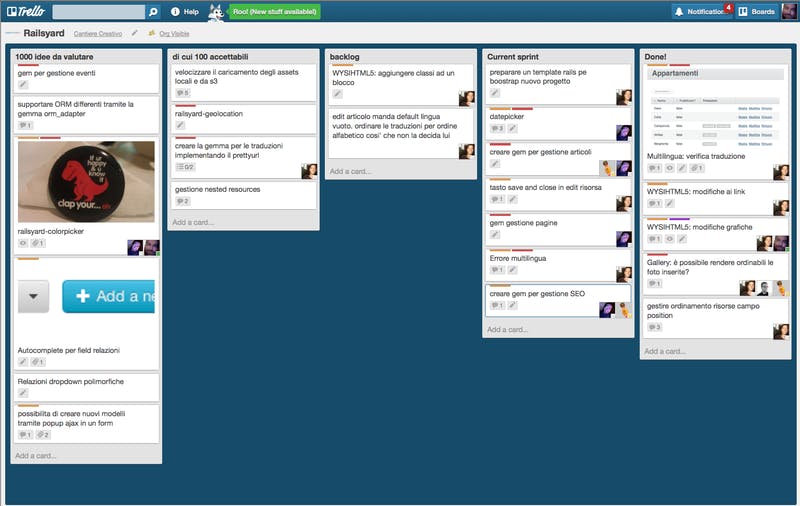
In short:
- Ideas: all the features that we or the client come up with during brainstorming
- Backlog: all the “ideas” judged feasible that make up the project's features
- Sprint: the weekly activities the Cantiere team will spend time on for the project
- Review: completed activities awaiting feedback from the client (or other stakeholders)
- Done: closed activities
This flow can be made as complex and extended as each project needs, but for us it's the starting point for all of them.
Trello's building blocks
As we said, Trello lets you combine many basic elements, structuring and shaping them to fit your needs.
It takes care and a good understanding of your own workflows, and you need to carefully build a workflow within the board; at first it can seem hard, but the payoff is unimaginable.
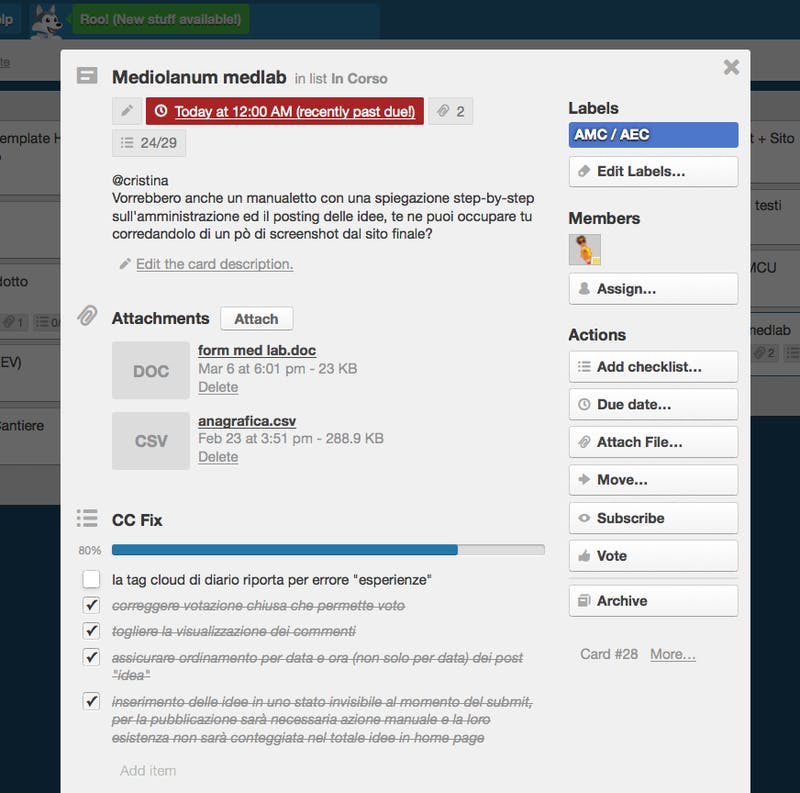
Here are the elements we can weave together to build the workflow: boards, lists, cards, labels, checklists, attachments, votes, due dates, members, comments.

Squaring the circle with Trello
So with Trello we have an almost perfect tool: Trello has no meeting environment, so without a meeting, physical or virtual, of the people sharing the tasks, the cards don't move. Interaction with other services is also very limited (the only ones supported are Google Drive and Dropbox).
Is a perfect Trello possible?
The biggest gaps we feel right now are:
- It isn't the ideal tool for bug management and time tracking, so you have to use something else (see Redmine)
- The ability to assign “weights” for the difficulty of each card. The developers deliberately left this feature out so as not to box Trello into one methodology. There is, however, a Chrome extension that enables it.
- someone to actually do what the cards say! :)
Write to us: we can share our experience and work out together how we can help.


